0 V7 G5 r# `; | 推荐一个超好用的python包folium, 专门用于地理数据可视化,官方英文教程教程点击这里。
/ ^6 j' x* n" b! l+ H
8 K" o) b$ }3 T. I6 J
使用方法很简单,操作如下:
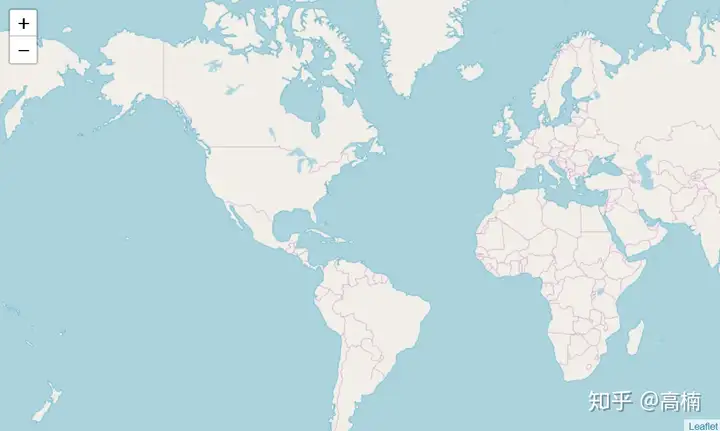
导入包,创建一副世界地图8 r0 {' }9 s$ `9 ]! z$ Z2 o
import folium
6 p e# V& r5 ? import pandas as pd. x6 Y3 ~; N8 @' A" S
& h$ a6 v$ S5 H% D, k" E3 } # define the world map
- Z. y5 ^- h3 r3 M2 `; C+ W4 t world_map = folium.Map()3 h& M- q1 S8 X- `5 D
- W3 S# ~$ D7 t6 p; \, m # display world map
& w7 i9 b X* d& n r1 v world_map
# G6 J G& ~: l! P! @/ r6 G
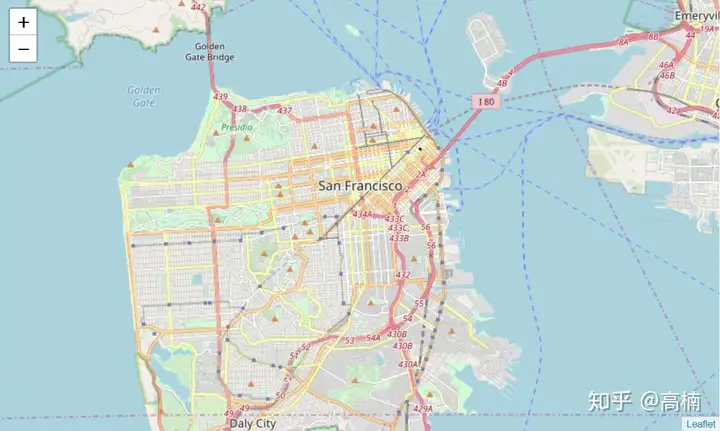
# Q1 M+ r t V 2. 输入经纬度,尺度,在这里我们以旧金山(37.7749° N, 122.4194° W)为例。
; @* p2 U) p$ C1 B/ ]
# San Francisco latitude and longitude values5 z8 b d" `- O
latitude = 37.77
) S* s0 a$ E/ B3 B; } longitude = -122.42
. h1 ]2 l9 n' T& h: a$ b
# ~9 N7 I9 x& G( q' `# F # Create map and display it! N) Q2 W0 V- [$ B* p
san_map = folium.Map(location=[latitude, longitude], zoom_start=12)( v f( N& s" O8 o
8 j0 W3 v# L1 B
# Display the map of San Francisco& a% E; X" T4 H3 b; _
san_map
' I3 F: h# M( ]; m: J% Z
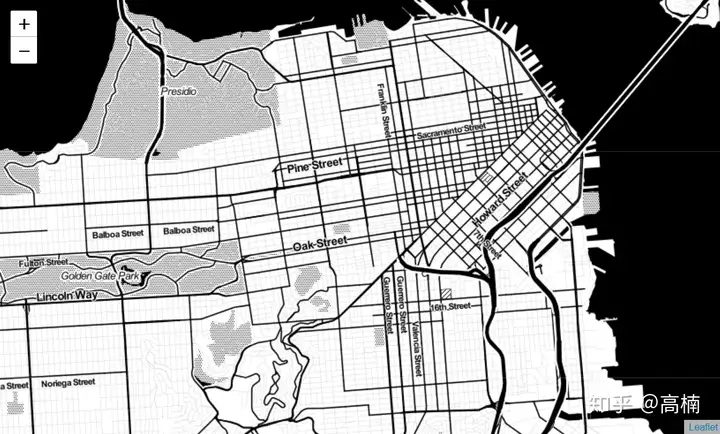
0 P0 e/ e) H, k! g0 q* P7 p 更改地图显示,默认为OpenStreetMap风格,我们还可以选择Stamen Terrain, Stamen Toner等。
# Q+ s J1 o) E. T
# Create map and display it
& d; B: [# {, T& o% I( B4 P3 T san_map = folium.Map(location=[latitude, longitude], zoom_start=12,tiles=Stamen Toner)
9 z" ]+ |2 t- S V- F 0 X; s: @: C( k
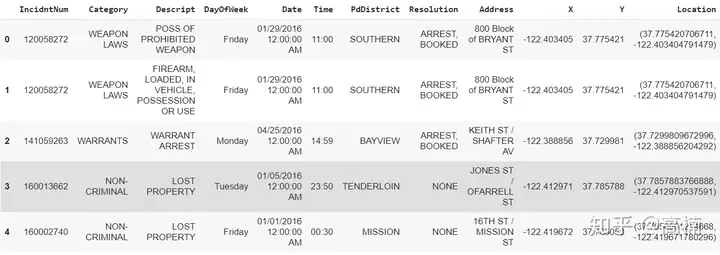
3. 读取数据集(旧金山犯罪数据集)
& k( _! v- c) ~3 U" u2 U # Read Dataset# w- T0 f% b' ~" v0 B" Y
cdata = pd.read_csv(https://cocl.us/sanfran_crime_dataset)5 {7 P! [ D- F+ R# Q
cdata.head()
2 W& S/ Q/ E! L
2 p' U# c% b# x$ }
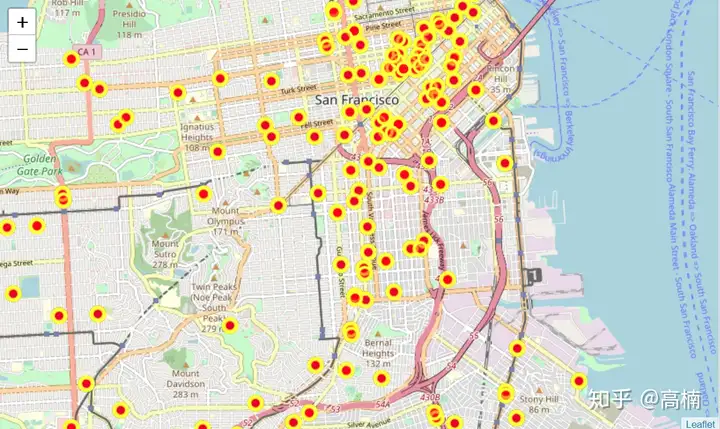
4. 在地图上显示前200条犯罪数据
4 D; T9 q+ Y( x( Y7 |; _) d # get the first 200 crimes in the cdata
/ Y3 _$ M# C6 r: \
limit = 200
5 o6 U* ~; E& h G1 s7 J3 z5 c, k data = cdata.
iloc[0:limit, :]
% f. T* y5 V; K% Z3 J( x
! v% a6 D8 |; e" [& ] # Instantiate a feature group for the incidents in the dataframe
% `$ t0 c1 v" K+ r6 ]0 X incidents = folium.map.FeatureGroup()
+ w7 T- C" j8 E& C, y' V) t' e8 E
- E' | q$ E$ h # Loop through the 200 crimes and add each to the incidents feature group
- m4 p2 J. R: x" v& ?% \" a; ~ for lat, lng, in zip(cdata.Y, data.X):
0 G s/ \; w: L4 Z
incidents.add_child(
% [+ J. |5 Y: t- Q, s d& U- J! H& R( k
folium.CircleMarker(
# C0 d$ D" h% I1 U3 a6 A2 Y [lat, lng],
3 z# P) D( ?' F# P
radius=7, # define how big you want the circle markers to be
5 H- n0 @4 d5 p9 i1 ` color=yellow,
/ N3 n* ^8 S8 m4 M/ G
fill=True,
% P8 n w9 J2 r5 R% G1 u3 ~( C/ P fill_color=red,
* g" \4 M( N$ L" ~( c( F& S
fill_opacity=0.4
$ m0 I6 L1 P# A4 c( @9 }; C+ R
)
9 ?" w/ M5 _4 }* h )
& h y* |! m% \9 z8 S
' Z8 V) ]/ \( t0 Z7 y # Add incidents to map
' V) L! C! ~" u
san_map = folium.Map(location=[latitude, longitude], zoom_start=12)
* Y4 D9 T9 z4 V7 F4 I7 \4 t3 V/ u [ san_
map.add_child(incidents)
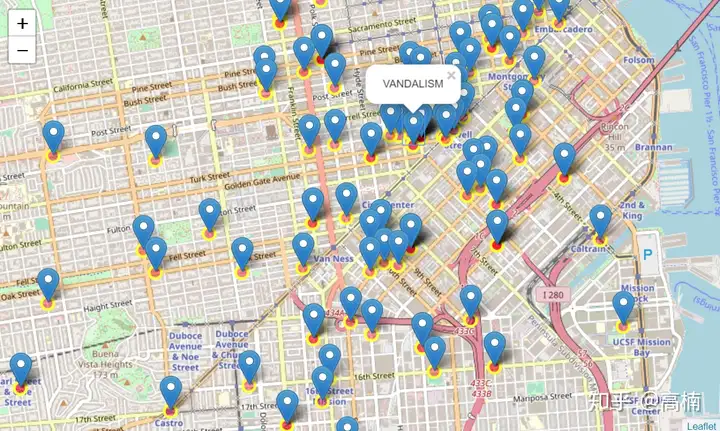
5. 添加地理标签
3 k0 W$ V Z; E. ^* w/ k* ?5 O
# add pop-up text to each marker on the map
5 ]- P. ^, H9 d; t( ]$ l latitudes = list(data.Y)
; Q$ Q1 }! h( l6 t$ x longitudes = list(data.X)
/ Y1 D8 X* Y+ J" N9 M3 W labels = list(data.Category)
4 L9 I1 f! P" V9 G2 P8 q% L! t
, I1 W) y2 ]. U: z2 d for lat, lng, label in zip(latitudes, longitudes, labels):
( H. F( ` ]. c; P( j5 F- H4 k; ~ Z2 _
folium.Marker([lat, lng], popup=label).add_to(
san_map)
$ V5 _( U2 r' q8 R- v% K z7 [- g6 _
# add incidents to map
# p2 e0 ?% }) ]# _3 ^
san_map.add_child(incidents)
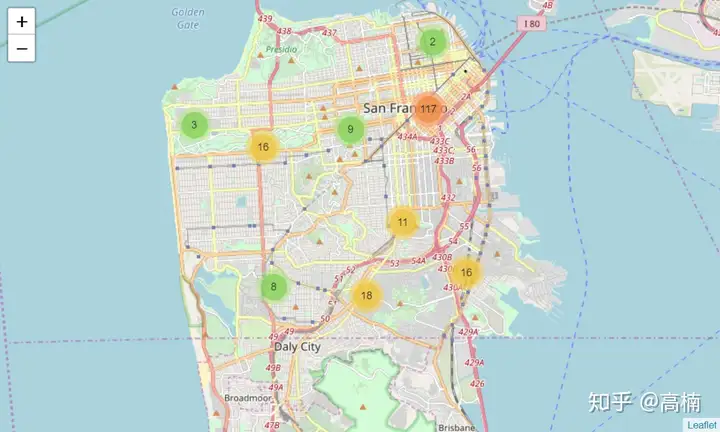
6. 统计区域犯罪总数
: [+ N n2 k* V7 c' T# g2 R: f from folium import plugins
' ?. f- b0 [, @" u: R7 I9 K4 z% X! E' ?
# lets start again with a clean copy of the map of San Francisco
* n$ [+ N* z- U k san_map = folium.Map(location = [latitude, longitude], zoom_start = 12)
V" @- m* \' J" c; o i& @. g: T2 ?. Y$ V3 B" A3 z; J6 J
# instantiate a mark cluster object for the incidents in the dataframe
7 v' K) Z# N5 V, {9 [! B incidents = plugins.MarkerCluster().add_to(san_map)
" h" v: ]$ X* G1 o! S- h( y/ q+ t: x8 I, r. L/ n% p g& E, V3 _& f
# loop through the
dataframe and add each data point to the mark cluster
, [2 b; @# ~0 E. k6 p+ S/ W for lat, lng, label, in zip(data.Y, data.X, cdata.Category):
! j7 H$ y3 k k* V5 h, K3 n" |7 J
folium.Marker(
4 G; W6 R; S. J0 U' N location=[lat, lng],
# ~- C; G, z4 C) i, ]5 l/ W
icon=None,
: q* q( \- t1 }6 ]. R( w% `
popup=label,
0 G- U% q) k Z& D3 B
).add_to(incidents)
8 @! y1 M. T9 ?) Y* z
; }6 w. M* O* e2 n' ]/ w7 _. Z # add incidents to map
/ S/ s; U* D+ {" J) {( L5 N' ]2 V san_map.add_child(incidents)
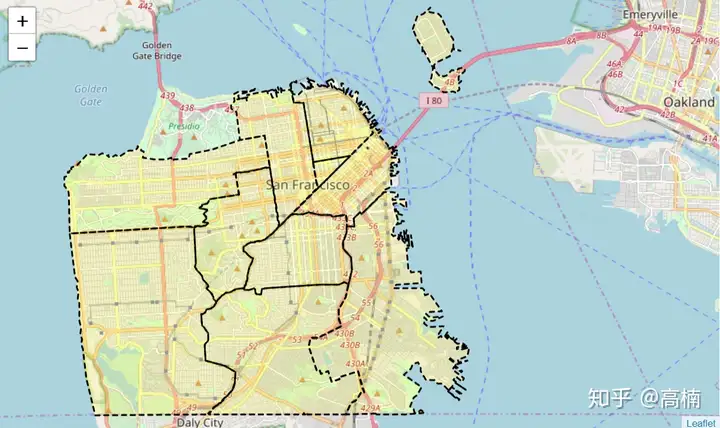
7. 读取geojson文件,可视化旧金山市10个不同Neighborhood的边界
# r! ? ^( b! a, B0 d import json* r" |8 [6 t1 C: N- b
import requests$ M! K/ q) Z' `, g
& M/ @; q$ f9 t3 O url = https://cocl.us/sanfran_geojson
7 F& w2 U8 C' [ R san_geo = f{url}; r- y% A3 m; ?. S( }6 r* o( ~
san_map = folium.Map(location=[37.77, -122.4], zoom_start=12)' a4 m7 G. c A
folium.GeoJson(( O V( a9 [) Y0 l
san_geo,
& X& C8 C6 f% Y) Y+ a% p style_function=lambda feature: {( e' w# y$ y$ z: R* x4 O
fillColor: #ffff00," ^. s1 n6 Q; Y0 V/ ~
color: black,
8 S( w8 Q6 E$ U& u: G- f6 B0 ] weight: 2,0 i' D8 h4 X$ f, @" z9 G1 l. c
dashArray: 5, 58 n. d/ f: Z' p3 A7 q w6 r
}6 x2 X ?. N5 J, ~7 |
).add_to(san_map)3 t% O5 ~& n$ ?7 U3 }' M* h
) k) }; a: Y4 Q) n #display map& C8 m- C0 x. i5 ?& B3 Z, c
san_map
# @7 o* x+ L5 X7 g. n! A: ^+ w
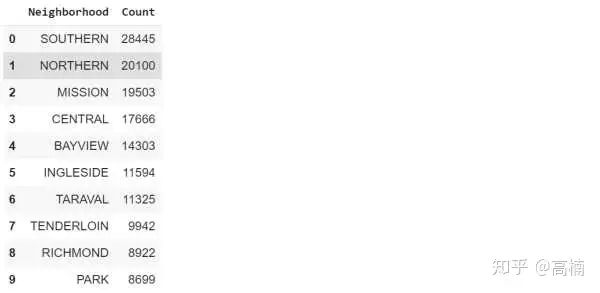
; i4 R S: X F( c 8. 统计每个区域的犯罪事件数目
& b0 l X3 G: M& I. V # Count crime numbers in each
neighborhood: }1 F W$ I6 O4 D& ? y9 e0 O, @% o
disdata = pd.DataFrame(cdata[PdDistrict].value_counts())
- X J V1 s7 Q
disdata.reset_index(inplace=True)
$ j0 q) B6 _4 Y9 v0 T
disdata.rename(columns={index:Neighborhood,PdDistrict:Count},inplace=True)
) O/ r) t, z+ F/ Q
disdata
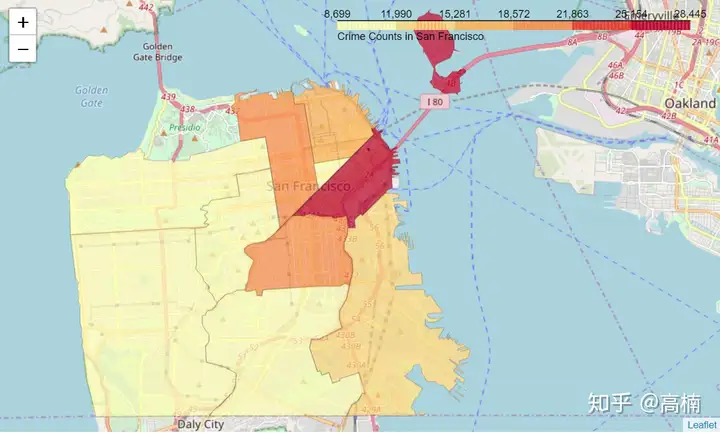
9. 创建Choropleth Map (颜色深浅代表各区犯罪事件数目)
' E4 w. G- L! g9 ?3 s7 [+ U m = folium.Map(location=[37.77, -122.4], zoom_start=12)
8 E# d4 a% n$ e1 a7 Y* I
folium.Choropleth(
! B6 {0 Z( Y8 z' p# B+ s% v: G8 l geo_data=san_geo,
# X* M6 X9 G2 Q* [( D8 s" ?2 p2 f- y" v data=disdata,
2 G, y& i3 f4 y: n columns=[Neighborhood,Count],
2 j2 ~% J( w# m4 O/ [
key_on=feature.properties.DISTRICT,
) \3 n; y; d6 H9 d7 T7 ]( R #fill_color=red,
7 ]# D \& a: x2 i1 ^1 i& C! c7 D
fill_color=YlOrRd,
* s& D$ {8 f, `0 F: x fill_opacity=0.7,
9 H5 ?; g/ K& J( n. S$ Z& w line_opacity=0.2,
: V5 U8 W8 |( P1 ?; |& p! w highlight=True,
- A4 H! Y" V: T# N4 G3 {" R
legend_name=Crime Counts in San Francisco
: s$ I/ A1 V# p" T. R% e: t' C ).add_to(m)
0 M: G) ]* A$ J9 y
m
: c7 Z+ j1 U: V( T0 U3 V, |% _1 g2 Y
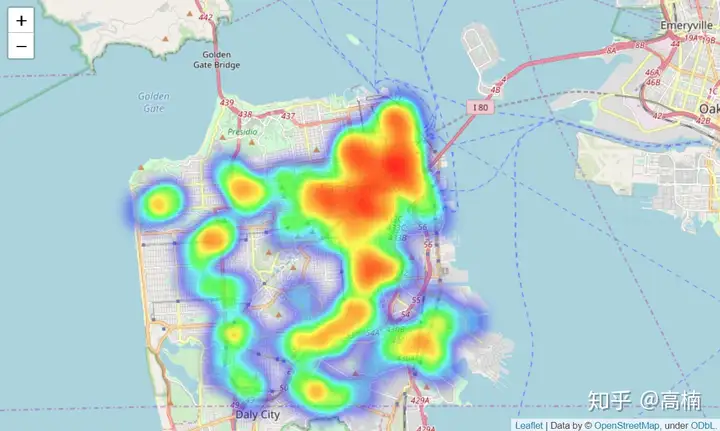
10. 创建热力图
0 ?! f; C" K+ P% L( ^
from folium.plugins import HeatMap0 x" c4 s# X6 X# r7 @; _7 ?/ T$ ]
3 @1 e( d1 ?8 U, \/ N3 k; Q # lets start again with a clean copy of the map of San Francisco) g% g2 b' }) x7 j1 B: s
san_map = folium.Map(location = [latitude, longitude], zoom_start = 12)" O; b9 [. Q1 q" O% g2 w
U2 P9 y- `. i! M' d6 ^2 }
# Convert data format
2 F( o" W$ z" ]# e7 B) {) ?- V heatdata = data[[Y,X]].values.tolist()
* R& B* c# p8 y: Y6 {+ p/ Q! u5 V. v8 e! D! V# i
# add incidents to map( [: m6 R/ l' [( L/ N% U
HeatMap(heatdata).add_to(san_map)8 ?; w& \/ v7 e2 H6 U
4 ?# v" e- I2 k1 |7 t2 |' o san_map
* |* N- B, `+ h' f0 n+ M/ U* g
! b6 E5 R( j+ q
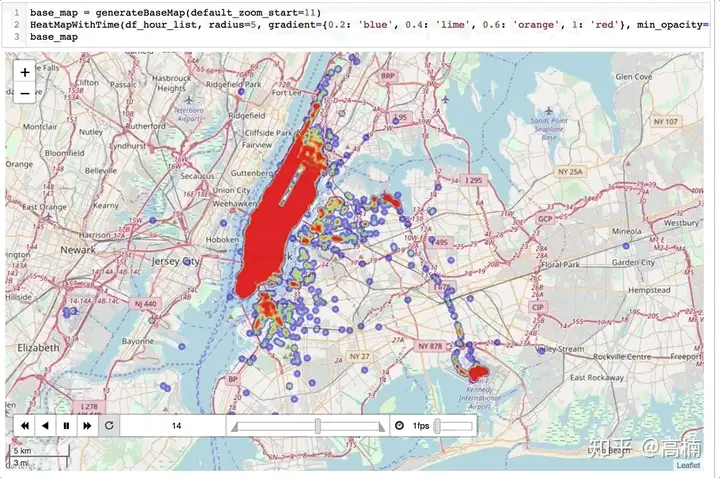
最后,folium还可以用来创建动态热力图,动态路径图等,具体可参考Medium上的这篇文章。
$ i# @4 a% m, ?* a 实现效果如下图所示 (直接从Medium上抱过来的图,详细代码请点击上述链接)。
. w/ Y/ I& O [1 N7 h+ ^% [
! F" A9 }6 X7 b& }# G/ M6 R3 @ 我的其他回答:
% D; ~. Q! M% ?* F6 Q H * `' v4 g3 _$ t5 w0 H6 g; X8 [
! Q+ W/ n! d! k0 A& M _ 9 Q9 } m, p1 @6 O3 U- q6 ^
最近有小伙伴私信我推荐一些学习编程的经验,我给大家几点建议:
1 M* \. ]% }1 H; a/ t& \
1. 尽量不去看那些冗长的视频教程,不是说学不到知识,而是,在你学到知识之前,你可能已经睡着了 =_=
i# `! Y2 B; c& N8 r 2. 不要贪多,选一个知名度高的python教程,教学为辅,练习为主。要随时记住,我们学习python的目的在于会用,而不是背过了多少知识点。
7 D# {9 B9 P' n6 K, | 给大家推荐一款我超喜欢的python课程——夜曲编程。我闲没事在上面刷了一些编程题目,竟回想起当年备考雅思时被百词斩支配的恐惧。这款课程对新手小白很适合。虽然有手机app,但我建议你们用网页端学习哈。
# X0 Z9 z. R a0 F; ` 最后,我的终极建议是:无论选什么教程,贪多嚼不烂,好好专注一门课程,勤加练习才是提高编程水平的王道。等基础知识学的差不多了,去Kaggle上参加几场比赛,琢磨琢磨别人的编程思路和方法就完美啦!
. B5 Z/ {4 w2 q+ e9 G1 \- n. t0 d7 S