; _$ N2 N# U3 b9 l) W$ ` R# C+ N
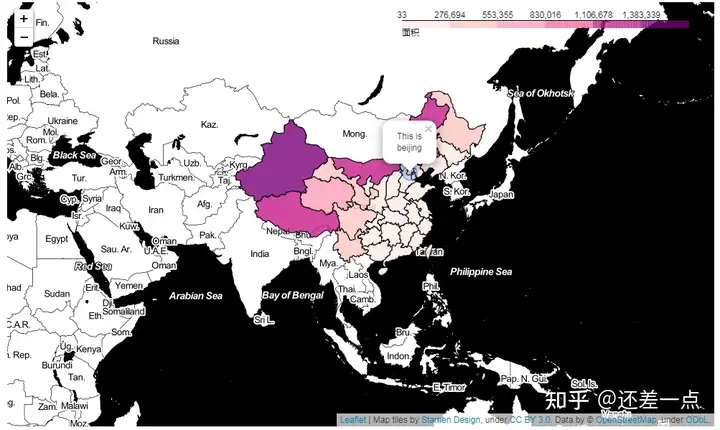
Choropleth 等值线图
. G7 [" ?5 F4 x" q import pandas as pd #读取数据2 n& i+ l& T$ @, ]1 X; k9 t$ a5 n# Z
from folium import Map,Choropleth,CircleMarker #用到的包
. K& @ k6 N/ K( G' l8 X% _ 9 Y! w" m0 E7 W7 X
#包含省的中国地图json
& F8 W4 r8 p: t( [ china_geo = fhttps://geo.datav.aliyun.com/areas_v2/bound/100000_full.json
; @! f% h- k0 L. @ #读取用到的面积数据 |) g0 }, K% C7 x- W1 u0 t+ n2 i
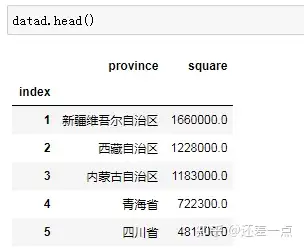
datad = pd.read_csv(Desktop/square.csv,index_col=index)& S8 T- V$ d2 C, G- u* V2 t# F7 E
4 ?4 Q3 Q! r7 k* h* p
6 |3 N- K% z- s7 h m=Map(tiles=Stamen Toner) #地图风格% S" G1 m/ {4 w8 N! N- U4 A/ V, Z
& d2 e& A) X6 ~8 E$ B, ~ Choropleth(china_geo, #选择json N- t! _' D5 B: F
data = datad, #数据$ z Q9 l6 X, v. Q
columns = [province,square], #列,第一个为key,第二个为value
1 D+ m0 X' @6 ]' V; ^$ z9 c6 { key_on = feature.properties.name,#匹配到json
9 f( d0 O/ g. [. H7 C& n fill_color = RdPu, #颜色
) L( E7 P: C* `; \8 Z- ]% B fill_opacity = 0.8, #填充透明度! P7 ]+ s R4 m) }4 f5 W, n
line_opactity = 1, #线透明度
2 I) }; |! k" Q5 K* _$ A3 W line_weight = 1, #线宽, _' ]7 d0 |3 h( q4 y$ R7 ~; q
legend_name = 面积 #图例+ V* Y8 u7 M+ x( h, O
" f6 e& Q# |/ \ e( G/ ^- v: x ).add_to(m)4 E* k; l, s! C$ h4 ^. g
CircleMarker(location = [39.907518, 116.397514], #坐标点
, q' N0 V) w$ z2 Y* F! A, r radius = 10, #半径
, x. k& ?$ o' Y8 o# j N fill = True, #填充- u7 i3 {0 ]' }3 x* w! ^$ x1 `
popup = This is beijing, #弹窗1 e! ?9 r3 T4 C$ s$ }
weight = 1 #circlemarker线宽 , T5 s, p8 f: @, s% z; q
).add_to(m)
$ q1 }3 l3 E3 K/ t2 E& b m.fit_bounds(m.get_bounds())
+ |2 i; W+ [' P* v* i! o) t; G* J m
Z+ E g& D- i
L/ F1 v- G' `* V7 }6 z 4 i8 v; H) }# D: }
数据地址: square.rar - 蓝奏云
' K. _/ u& m6 O/ L. ~9 K* P 两个重要的网站 $ i, q* k% C9 T; i0 o
手动绘制geojson * q, U* {8 A3 ]) d
. P6 _! M8 F6 e$ @ 目前更新的geojson 3 ? y$ E! v+ g8 ^5 E
+ a* s/ ~2 ?9 ^
geojson格式
8 a8 H2 Q+ P* r# L3 j3 w8 @ {$ g) @# U3 L/ A7 B- V: O* l
"type": "FeatureCollection",
( I3 u! J4 A! [$ L4 j( R4 l; h6 \% w "features": [7 t4 C# m! u$ z" B9 R6 Y
{/ a/ U+ r; ~$ }& P- r+ }
"properties": {"name": "Alabama"},
) U$ A1 o8 V8 q- e! G "id": "AL",
* o1 N! s% Y& G, O2 B "type": "Feature",
! ^# t$ v9 n4 E# l l' Y' h; K "geometry": {
6 _: t5 T- ~; E, } "type": "Polygon",
2 c- N, `0 i' E) l% G) K' Y "coordinates": [[[-87.359296, 35.00118], ...]]# V3 o( l# b: Q% ?1 s q6 t7 B
}
9 u% i0 t1 ]3 Z( ]2 F' f. L },
2 ~& h+ M) x0 }8 r7 Z I {# c2 [% N, \' `1 H/ k
"properties": {"name": "Alaska"},
! B8 B/ Z, a0 ?4 L: v9 i4 a1 F "id": "AK",3 ?9 A8 a. Y) T4 a" R V
"type": "Feature",/ \; m( [! n9 d5 M% V- b9 m
"geometry": {' O m e: L% g/ y
"type": "MultiPolygon",
+ }! U8 j5 e3 u Y" h8 @! p3 m) f "coordinates": [[[[-131.602021, 55.117982], ... ]]], Z5 F) y6 `3 p. D; [4 n
}
% p# u2 C( y3 \1 y! r2 O },
5 }( z5 d0 b) i ..., z+ m, r& }. Q
]/ J: |8 s0 Y( [% {, S
}+ Y/ b; t2 M- q; k3 d
2 h8 h) t$ B& z/ l% B* Q7 T; X
读取本地的json文件 2 ~: W/ m' w" k' S7 h8 O+ U. f2 G
f = open(zhengzhou.json)
# Q. u) ^4 v' O6 K t = json.load(f)/ b; K" d& w3 H5 y7 l1 _$ {$ X
5 M1 z9 c) U( ^1 P3 I
读取网络json
3 J+ d$ K! m! Q7 e3 r# i url = (6 b' \% U( ]+ g2 L. e' z L" K
"https://raw.githubusercontent.com/python-visualization/folium/master/examples/data"2 T! B9 I" Z& R. O
)
. K& X$ S6 m/ y# W2 ~0 P us_states = f"{url}/us-states.json"- P ?# b- q! o9 {. V
1 S0 z6 p- M Q$ `4 i+ d6 e$ ~ geo_json_data = json.loads(requests.get(us_states).text)
" y6 w7 H5 E) ~0 J) C+ b
# V. b+ t0 V4 i1 Z _0 ^) t8 B# Z
( u0 I2 q+ I1 g* _
. b& @1 \3 U* ^5 d0 D0 i8 O' V" t' d! [' M
$ D* A w4 H" g5 o9 L
|